
If you’ve created printed reports, strategies or leaflets before, you’ll recognise most of the steps in creating an accessible PDF – brief, content, design and production. Producing accessible PDFs follows a similar path, but there are a few crucial differences that affect timings and budget. Understanding these upfront makes projects smoother and helps avoid last‑minute surprises.
Accessible PDFs differ in two key ways:
- Accessibility needs to be considered in every phase. The earlier we think about it, the easier, more efficient and cost‑effective the project is. Leaving accessibility to the end often means rephrasing, redesigning or restructuring elements that are harder to fix later, duplicating work and adding cost.
- There are three additional project phases. InDesign file preparation, remediation and testing are essential to making the final PDF work properly with assistive technology, so they need to be planned into your schedule.
Accessibility needs to be considered in every phase
Accessible PDF standards include requirements that mean accessibility touches every phase of the project, from content creation and design to final testing.
To make your content accessible, you’ll need to consider things like hierarchical headings, meaningful link text, minimal use of acronyms and initialisms, and avoiding long runs of endnotes.
Design is accessible when there is, for example, a clear reading order, colour combinations that meet contrast requirements, a lightened cognitive load for the reader, suitable type sizes, and an InDesign file set up so the exported PDF can be remediated efficiently.
I can advise on content structure and design, or step in once you have a draft, depending on your team’s confidence and capacity.
The three additional project phases for accessible PDFs
InDesign file preparation
For print‑only projects, designers rarely set up files with accessibility in mind, because there’s no need. For accessible PDFs, we need to allow time in our project schedule to prepare the InDesign file for accessibility.
This additional step includes setting a logical stacking and text flow order, configuring hyperlinks and mapping styles to export tags. The aim is to use InDesign’s built‑in capabilities as far as possible, so the exported PDF is in good shape and the later remediation phase is faster and more cost‑effective.
Remediation
Even with accessible content, design and a well‑prepared InDesign file, it’s unusual to get a fully accessible PDF straight from export. Additional behind‑the‑scenes work is almost always needed to fix tagging omissions or errors introduced by the originating software. This work is called remediation – our second additional project phase.
Testing
Finally, testing checks whether the file behaves as expected for people using assistive technology. I test with Acrobat’s accessibility tools, PAC and the NVDA screen reader to confirm that the document can be navigated logically and that key information is announced correctly.
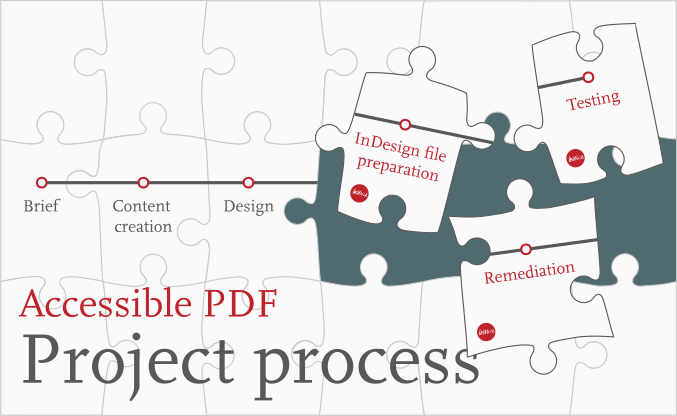
That means, in practice, the full project process looks like this:
- Brief
- Accessible content creation
- Accessible design
- InDesign file preparation
- Export to PDF
- Remediation
- Testing
How it works in practice
Clients involve me at different stages. Some ask for guidance from the start; others bring me in once they have a design.
Clients who don’t have in‑house accessible design expertise can:
- Outsource the design and accessibility to me. I can work from your content and brand to create accessible designs, prepare InDesign files, remediate and test the PDFs.
- Keep your existing designer and add me to the project team for accessibility. I can review draft designs, advise on accessible content and layout, then prepare the InDesign file, export, remediate and test the final PDF.
Designers, design agencies or in-house design teams, typically work with me in one of three ways:
- Collaborate during the design phase. This is best when you want to keep design in‑house. After all, you are familiar with your client’s branding and design preferences. And you probably have a bank of work you’ve already done which you can draw on for new projects. So keeping design in-house can make a lot of sense in this situation. However, depending upon your knowledge and confidence in accessible design, you might find it helpful to work together during this phase. Your team still leads on brand and visuals but I review draft layouts, and highlight accessibility issues early along with suggested practical adjustments. Once the design is approved, I prepare the InDesign file, export, remediate and test the PDF.
- Outsource the design. Ideal when you don’t have capacity or confidence in accessible design. This is a good option for a first project – once you understand the visual adaptations needed, you may feel more confident taking this part of the process back in house. I create the design, set up the InDesign file with accessibility in mind, and then handle remediation and testing. This reduces the need for elements to be reworked and speeds up sign‑off.
- Hand over after design is complete. In this scenario, you retain full control of the design and bring me in once layouts are signed off. It can work, but there is a higher risk that I’ll need to suggest changes to structure, colour or type size before an accessible PDF is possible, which may mean revisiting design work you’ve already done.
Wherever possible, I recommend involving me during the design phase. It almost always saves time and reduces frustration later.
Have questions or a project in mind?
If you’re looking for support with an accessible PDF project, you can learn more about how I work with clients on my Accessible PDF design, remediation & testing page.
If you’re planning a report, strategy, policy or other PDF and want to make sure it’s accessible, I’m happy to talk through your project and where accessibility fits, or review one existing PDF and outline the steps needed to bring it up to standard. Just send me a message!
Get in touchRelated posts
 Recent posts
- Accessible PDF heading structure and the problem of phantom headings
- Accessible colour contrast for text
- How we can work together on accessible PDFs
- Acronyms & initialisms
- The best fonts for accessibility
Featured posts
Briefing a designer
Eight reasons to use freelance creatives
Putting a freelance designer at the heart of your project

Hello! I’m Sarah, an independent typographic designer.
I’ve been sharing my knowledge about design, typography, marketing, branding and printing since 2014. I hope you enjoy reading my blog.

Sarah Cowan